Written by Paul Worrall
Most AI image tools work the same way: you type a prompt, something generates, you either use it or type another prompt. The results can be impressive but the process is essentially passive — you’re describing what you want and hoping the model interprets it correctly, with limited ability to control exactly how the output is reached or to build on previous steps in a structured way. Flora AI takes a fundamentally different approach, and whether that difference matters to you depends almost entirely on how you work.
I run Discount Art Supplies, used by over 36,000 UK artists every week, and AI tools for creative practice come up constantly in our community — particularly as the tools get more capable and the question shifts from “can AI make art” to “how do working artists actually integrate this into their practice.” Flora is one of the more interesting answers to that question in 2026. Here’s the honest picture.
⭐ Quick Verdict
Best for: Digital artists, illustrators and designers who want genuine control over multi-step AI workflows rather than single-prompt generation. Concept artists building repeatable pipelines. Creative professionals who already work in tools like Figma or Miro and want the same visual logic applied to AI generation.
Pricing: Free tier available. Paid plans from $16/month (annual) with 20,000 credits. Credit rollover included — unused credits carry forward.
The catch: Real learning curve. Not a one-click tool. Advanced video models can burn through credits quickly. Not the right starting point for casual experimenters.
Bottom line: If you’ve ever found standard AI tools frustrating because you can’t control the process, Flora is genuinly worth the learning investment. If you want quick, easy AI images, start with something simpler.
What Flora AI Actually Is
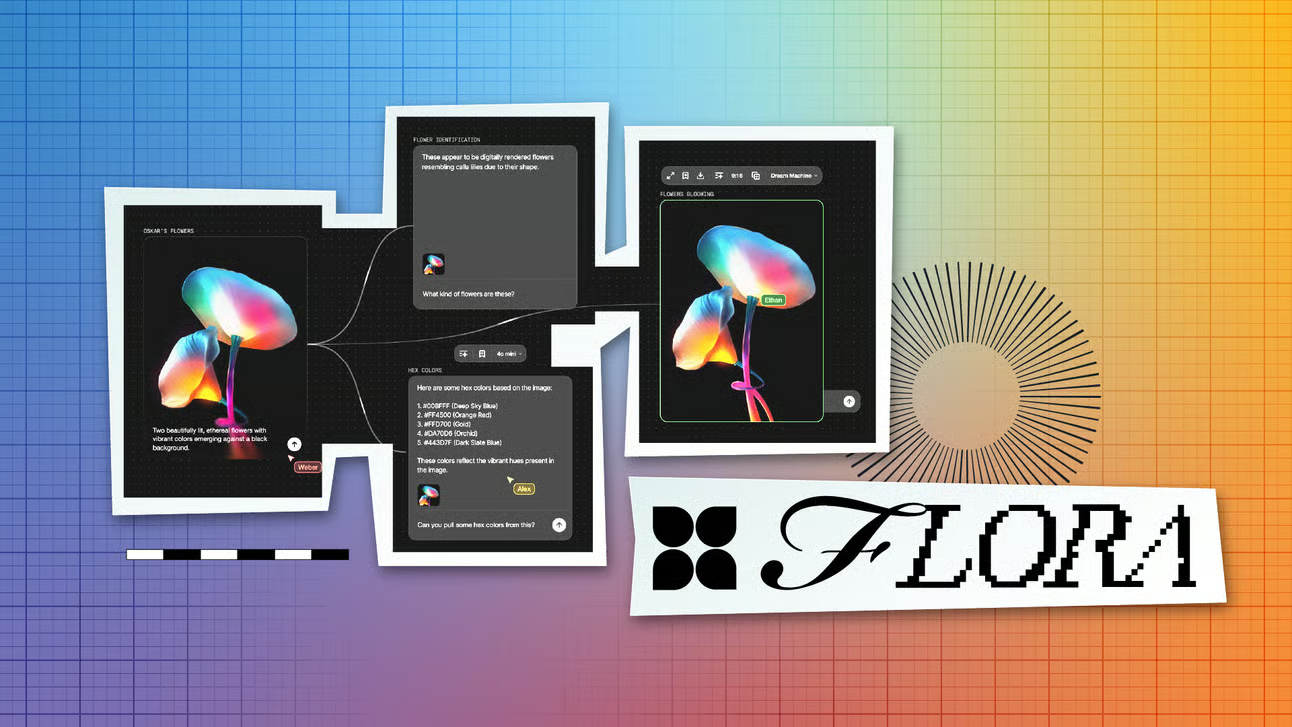
Flora AI — officially Flora Fauna — launched in February 2025 and quickly earned the number one spot on Product Hunt. The concept is straightforward to explain and genuinly different to use: instead of a single prompt box, you work on an infinite canvas where each AI operation is a node, and you connect nodes together to build multi-step creative workflows. Type a prompt in one node, connect its output to an image model in the next, connect that output to a style-transfer node, connect that to a video generation node — and you’ve built a pipeline you can reuse, adjust and iterate on rather than starting from scratch every time.
The platform connects 50+ existing AI models — Flux, Veo, Kling, GPT-5, Midjourney-compatible models, Nano Banana and others — rather than training its own, which means you get access to the latest models as they’re released without waiting for a platform update. Flora’s built-in agent, Fauna, can help ideate and iterate directly on the canvas. The whole thing runs in the browser with no installation or local GPU required.
Backing tells you something about where this is positioned: Flora has raised $42 million in Series A funding from Redpoint Ventures, with angels including Twitch co-founder Justin Kan. Agencies including Pentagram and studios at Lionsgate already use it for production work. This isn’t a hobbyist experiment — it’s a professional creative tool built for people producing assets at volume.
The Node-Based Workflow — What It Actually Means for Artists
The node concept is borrowed from 3D software like Blender and Houdini, where it’s been standard for years, and from design tools like Figma where the visual logic of connecting elements is now intuitive to a generation of digital designers. If you’ve used either, Flora’s interface will feel reasonably familiar. If you haven’t, there is a genuine learning curve — independent reviewers consistantly describe it as rewarding once you’re past the initial unfamiliarity but genuinly steep for complete beginners.
For artists specifically, the workflow advantage is most visible in concept development and iteration. Traditional AI generation: you prompt, you get an image, you prompt again, you lose your previous attempts. Flora: you build a branching workflow that keeps every variation on the canvas simultaneously, lets you compare outputs side by side, and lets you refine one branch without losing the others. For illustrators developing character concepts, concept artists exploring multiple directions, or anyone doing systematic visual exploration, that ability to keep the full history of creative decisions visible is genuinly significant rather than just a nice interface feature.
Pricing — Is It Worth It?
Flora overhauled its pricing in January 2026, moving to a shared credit pool system. The free tier gives you enough to test workflows properly before committing. The Pro plan at $16/month (annual) with 20,000 credits is described by independent reviewers as the sweet spot for solo creative professionals. Credits roll over if you don’t use your full monthly allocation, which is a genuinly useful feature for artists whose workload varies month to month rather than running a consistent production volume.
The honest caveat on pricing is the credit burn rate on advanced video models — Veo 3, Kling and similar video generation nodes consume credits considerably faster than image generation, which can make video-heavy workflows expensive at the standard plan level. If your interest is primarily in image generation and concept development rather than AI video, the credit economics are considerably more manageable.
Flora AI vs Standard AI Image Tools
The closest direct comparison is Krea AI, which also brings multiple generative models together — but where Krea leans toward real-time generation and editing, Flora centres on the node canvas and workflow reuse. Midjourney still produces superior artistic results for single hero images according to most independent tests, but can’t match Flora for systematic campaign or series production where brand consistency and repeatability matter. Many professional digital artists use both: Midjourney or similar for individual high-quality images, Flora for building the workflows that produce consistent assets at volume.
For artists coming from traditional practice who are exploring AI tools for the first time, Flora is probably not the right starting point — the learning curve is real and the value proposition is most visible once you’re past the basics of AI image generation. Our best drawing apps for iPad guide and Procreate vs Adobe Fresco comparison cover more accessible starting points for digital drawing specifically.
Who Should Actually Use Flora AI?
Worth the investment if: You’re a working digital artist, illustrator or designer who’s genuinly frustrated by the lack of control in standard AI tools. You do concept art, character development or series work where repeatability and variation comparison matter. You’re comfortable with visual workflow tools and have the patience for a learning curve that pays off quickly once past the initial unfamiliarity.
Probably not for you if: You want quick, easy AI image generation without a workflow investment. You primarily paint or draw digitally and want tools that complement traditional mark-making rather than generate from scratch. You’re brand new to AI creative tools and want the simplest possible entry point.
The free tier is generous enough to form a genuine opinion before spending anything. If the node-based workflow clicks for you in the first couple of sessions, the Pro plan at $16/month is a straightforward decision. If it doesn’t click, you haven’t lost anything.
More Digital Tools for Artists
- The Best Drawing Apps for iPad
- Procreate vs Adobe Fresco — Which Is Right for Digital Artists?
- The Best Adobe Illustrator Alternatives for Artists
- GIMP vs Photoshop — Which Should Artists Actually Use?
- The Best AI Video Tools for Artists
- Discount Art Supplies — Compare Prices Across All UK Art Retailers