Written by Paul Worrall
The GIMP vs Photoshop question has been asked and answered many times over, usually by photographers or web designers comparing file handling and retouching tools. This guide is written specifically for artists — painters, illustrators, mixed media makers and digital creatives who use image editing software as part of a creative practice rather than a production workflow. The question looks meaningfully different from that angle, and the answer changes depending on what you’re actually trying to do.
I’ve spent sixteen years in the UK art supplies industry and now run Discount Art Supplies, used by over 36,000 UK artists every week. Software questions come up constantly in our community — particularly from artists at the stage where they’re deciding whether to commit to Adobe’s subscription model or find a credible alternative. Here’s the clear, current picture.
⭐ Quick Verdict
Choose Photoshop if: You do serious digital painting or illustration, need professional-grade AI tools (Generative Fill, Neural Filters), work with CMYK for print output, or are building professional creative skills where industry-standard software matters.
Choose GIMP if: Budget is a genuine constraint, you primarily do photo editing and basic compositing rather than painting, you’re on Linux, or you want to experiment with digital tools before committing to a subscription.
The honest truth: GIMP does roughly 80-90% of what most artists need, for free, forever. But the 10-20% it doesn’t do well — brush engine quality, AI tools, non-destructive editing — happens to be exactly the area where artists specifically notice the gap most.
What GIMP Actually Is

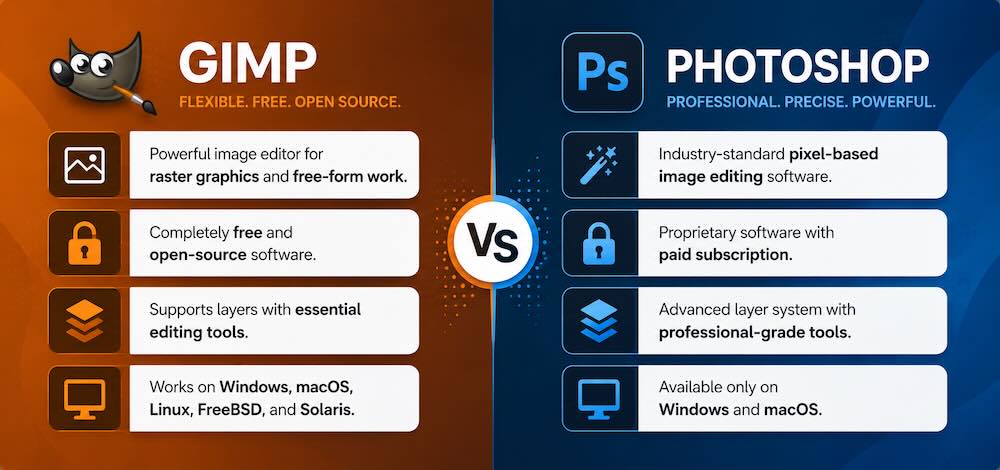
GIMP — the GNU Image Manipulation Program — is a free, open-source image editor developed by a global community of volunteers since 1995. It runs on Windows, macOS and Linux, requires no account or subscription, and has no ongoing cost at any level. The feature set covers layers, masks, filters, path tools, selection tools, colour correction and basic digital painting — a genuinely comprehensive toolkit for a free application, particularly if you extend it with the G’MIC plugin which adds over 500 additional image processing operations for nothing.
The important thing to understand about GIMP is that it’s built primarily by developers for developers and technically confident users, rather than being designed from the ground up for artists or photographers. That distinction shows in the interface, the workflow logic and — most relevantly for artists — the brush engine.
The Brush Engine — The Biggest Difference for Artists

For photographers comparing the two, the brush engine is a relatively minor consideration. For artists doing digital painting or illustration, it’s the single most importent difference between the two applications and the area where the gap between GIMP and Photoshop is most visible in practice.
Photoshop’s brush engine is genuinly excellent — pressure sensitivity, tilt detection, velocity response, advanced blending modes, and a system that makes brushes feel like they have physical weight and texture rather than just depositing uniform colour. The brush customisation options are deep enough that digital painters spend years building and refining their personal brush libraries, and the way Photoshop handles wet mixing and colour blending on a digital canvas has improved substantialy in recent versions to the point where it genuinly approaches what Adobe Fresco’s Live Brushes do for watercolour simulation.
GIMP’s brush engine does the basics — pressure sensitivity works with a drawing tablet, you can create and import brushes, opacity and flow controls are available. But independent testers and working digital artists consistently describe it as feeling less responsive and less nuanced than Photoshop’s equivalent, particularly for fine line work and detailed illustration. For photo editing, compositing and graphic design work, this difference is largely irrelevant. For artists who paint digitally for hours at a time, it’s noticeable from the first session.
AI Features — Where the Gap Has Widened Most Recently
The most significant way the comparison has shifted in the last two years is AI tools, and this is unambiguously Photoshop’s strongest current advantage. Generative Fill lets you select any area of a canvas and generate new content from a text prompt — extending backgrounds, removing objects, adding elements, filling in gaps — with a quality and speed that would have seemed impossible three years ago. Neural Filters handle skin retouching, colourisation, depth enhancement and style transfer directly inside the application. These aren’t gimmicks — they’re genuinly useful tools that compress hours of manual work into seconds for the specific tasks they handle well.
GIMP has no comparable built-in AI features. Some third-party plugins provide limited neural-based filters through G’MIC, but the gap between what Photoshop’s Generative Fill can do and what GIMP’s plugin ecosystem offers in the AI space is currently large and growing rather than narrowing. If AI-assisted editing is important to your workflow — and for many artists working on composites, concept art and digital illustration it increasingly is — this is the clearest practical reason to choose Photoshop over GIMP in 2026.
Non-Destructive Editing
Photoshop’s Smart Objects system allows you to apply filters, transformations and adjustments non-destructively — meaning you can go back, change your mind and adjust any edit indefinitely without degrading the original. The whole system is built around maintaining editability throughout a complex, multi-layer workflow in a way that mirrors how professional creative projects actually develop: iteratively, with frequent changes of direction.
GIMP’s approach to non-destructive editing is less flexible. Layer effects and adjustment operations work, but they don’t persist and remain editable across sessions in the same way Smart Objects do. For artists working on complex, multi-layer illustration projects over extended periods, this is a real practical limitation rather than a technical detail.
Cost — The Genuine GIMP Advantage
Adobe’s Creative Cloud Photography plan — which includes Photoshop and Lightroom — costs around £9.98/month or roughly £120/year. Over three years that’s £360. Over five years it’s £600. GIMP is free forever, at every level, with no account required. For students, hobbyists, artists early in their practice, or anyone for whom the subscription cost is a genuine barrier, that’s a real and meaningful difference rather than just a price comparison exercise.
The honest counterpoint is that if Photoshop genuinly helps you produce better work or work more efficiently, the subscription cost is recoverable quickly from the value of a single client project or a few extra print sales. The question isn’t really “which is cheaper” but “does the extra capability justify the cost given how I actually work.”
The Interface Question
GIMP’s interface has a reputation — not entirely undeserved — for being unintuitive, inconsistent and occasionally maddening. The layer palette, tool options, and workflow logic don’t follow the conventions that Photoshop users and even general software users have come to expect. The most recent versions have improved this meaningfully, and GIMP 3.0 — now in release candidate stage — brings a significantly more coherent single-window interface. But the learning curve is real, particularly if you’ve used Photoshop before, since the muscle memory from one doesn’t transfer cleanly to the other.
Photoshop’s interface is genuinly more polished, more consistent and better documented — with Adobe’s own official tutorials, extensive online courses and a massive YouTube community making it considerably easier to learn specific techniques than GIMP’s more community-driven and fragmented documentation.
Who Should Actually Use GIMP?
GIMP is genuinly the right choice in several specific situations. If you’re on Linux, it’s essentially your only serious option since Photoshop has no Linux version. If budget is a real constraint — student, hobbyist, early career — GIMP eliminates the subscription barrier entirely and does roughly 90% of what most people need for free. If you primarily do photo editing, basic compositing and web graphics rather than detailed digital painting, GIMP’s limitations in the brush engine matter considerably less. And if you want to experiment with digital tools before deciding whether to commit to Adobe’s ecosystem, GIMP is a genuinly sensible starting point.
Where GIMP specifically falls short for artists is detailed digital painting and illustration, AI-assisted editing, professional CMYK print production and complex non-destructive workflows over extended projects. If any of those are central to your practice, Photoshop’s advantages are real and the subscription cost is more justifiable than it might initially appear.
The Alternatives Worth Knowing About
The GIMP vs Photoshop comparison isn’t the only choice available in 2026, and for artists specifically there are other options worth considering. Affinity Photo 2 offers a one-off purchase price (no subscription) with a feature set that genuinly competes with Photoshop for most tasks. Krita is a free, open-source painting application specifically designed for digital artists rather than photographers — its brush engine is considerably more capable than GIMP’s for painting specifically. And for iPad users, Procreate and Adobe Fresco offer compelling digital painting environments that sidestep the desktop software question entirely for artists who work on tablet. Our Illustrator alternatives guide covers the wider landscape of subscription-free creative software in more depth.
The Bottom Line
GIMP is a genuinly impressive piece of free software that does most of what most artists need most of the time. The gap between it and Photoshop is real but narrower than it was five years ago in most areas — except the brush engine and AI features, where Photoshop has pulled ahead rather than GIMP catching up. For artists who paint digitally seriously, the brush engine difference is felt every session. For artists who primarily edit photos, assemble composites and produce web-ready graphics, GIMP does the job without the ongoing cost.
The most useful way to make the decision: download GIMP, use it for a month on your actual work, and see whether the limitations you hit are the specific ones that matter for what you do. If they aren’t, you’ve just saved yourself £120 a year. If they are, you’ll know precisely what you’re paying for when you subscribe to Photoshop.
More Digital Tools for Artists
- The Best Adobe Illustrator Alternatives for Artists
- Procreate vs Adobe Fresco — Which Is Right for Digital Artists?
- The Best Drawing Apps for iPad
- The Best Monitors for Graphic Design
- The Best Laptops for Graphic Design
- Adobe Creative Cloud for Artists — Is It Worth It?
- Discount Art Supplies — Compare Prices Across All UK Art Retailers