Wacom Intuos Pro Review — Best Drawing Tablet for Artists in 2026?
Last updated: May 2026
I want to be upfront about something. I’m primarily a traditional artist — watercolour, occasionally oils, and the kind of sketching you do in a notebook while waiting for something. I am not a digital illustration professional. What I am is someone who runs the UK’s largest art supplies community, who has spent years watching the digital art tools market evolve, who has a son called Zach who is increasingly serious about illustration, and who has handled enough drawing tablets to form a reasonably useful opinion about them.
When Zach started getting serious about digital illustration — partly from those gallery visits we do as a family, partly from a Domestika course he’s been working through — the drawing tablet question came up almost immediately. He’d been using a basic Huion entry-level tablet that he’d had as a Christmas present, and while it served him well enough to learn the basics, he’d hit the ceiling of what it could do. The conversation about upgrading led to an extended period of research that I found myself getting drawn into far more than I expected.
The Wacom Intuos Pro kept coming up. Here’s what I actually think about it.
What’s New in the 2025 Wacom Intuos Pro
Wacom completely redesigned the Intuos Pro in 2025 — this isn’t a minor refresh. The 2025 version is meaningfully different to its predecessor in several ways that matter.
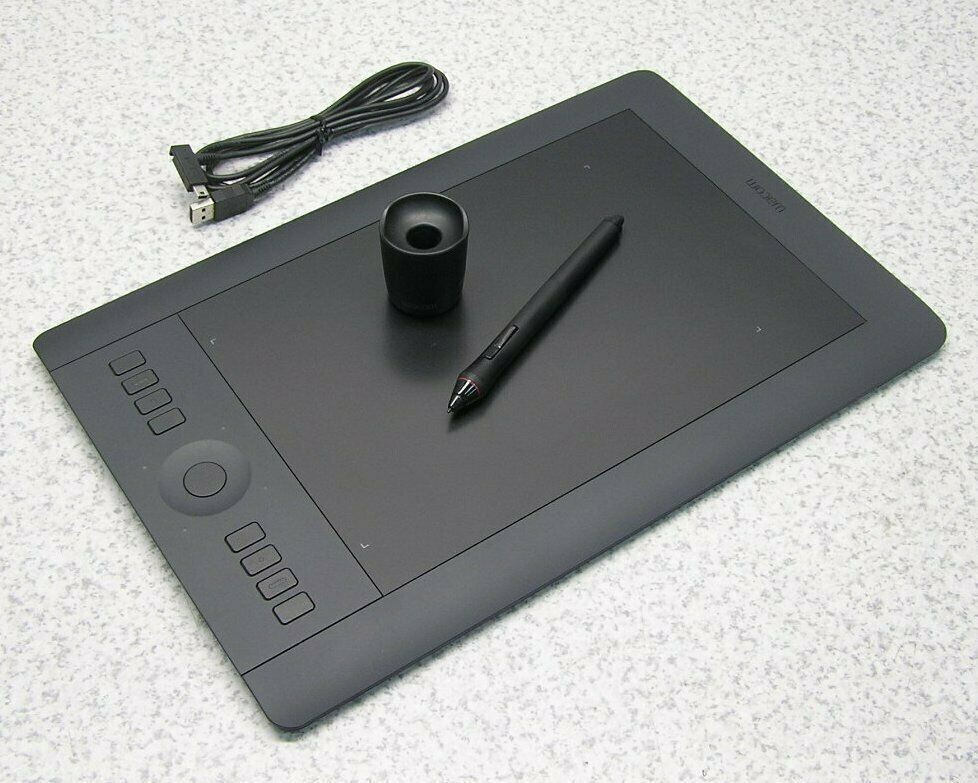
The tablet is significantly thinner and lighter — a 40% weight reduction compared to the 2017 model. The magnesium alloy back gives it a premium, robust feel despite being lighter. The drawing area is larger relative to the overall footprint. The classic ExpressKeys have been repositioned to the top of the tablet and the touch ring replaced by two mechanical analogue dials — a change that divided opinion among users who were used to the old layout but which most people adapt to quickly.
The Pro Pen 3 is the biggest upgrade. Wacom’s most advanced pen to date — 8,192 levels of pressure sensitivity, 60° tilt recognition, battery-free, and now genuinely customisable in a way previous pens weren’t. You can adjust the grip size, weight distribution, button layout and nib type. For artists who are particular about how their pen feels in the hand — and most serious digital artists are — this level of customisation is genuinely useful.
Bluetooth 5.3 with dual device pairing is a practical improvement — you can stay paired to two computers simultaneously and switch between them with a single button press. For anyone who works across a home studio and a work machine that’s a real quality of life improvement.
The Three Sizes — Which One Should You Buy?
The Intuos Pro comes in Small, Medium and Large. The size question is one of the most genuinely important decisions in buying a drawing tablet and one that most reviews treat too casually.
Small — the most portable option, genuinely pocketable in a jacket pocket, good for travel and tight desks. The active area is smaller which means your hand movements need to be more precise and controlled. Some artists find this suits their style perfectly. Others find the smaller active area constraining, particularly for larger sweeping gestures. The Small is the right choice for artists who work primarily from reference and need precise control, or who travel regularly and need something they can throw in a bag.
Medium — the one most artists should buy. The active area is generous without requiring large arm movements, it fits comfortably on a desk alongside a keyboard, and the price is significantly lower than the Large. The vast majority of professional digital artists I’ve seen work use a Medium tablet regardless of what else they own. It’s the sensible default.
Large — for artists who work across multiple monitors, who prefer large sweeping gestures when drawing, or who are doing detailed technical work across a very large canvas. Also good for left-handed artists who find the ExpressKeys positioning on smaller tablets awkward. The price premium is significant and for most artists it’s not justified by the larger active area.
Zach ended up with the Medium. The right decision.
The Pro Pen 3 — Where Wacom Still Leads
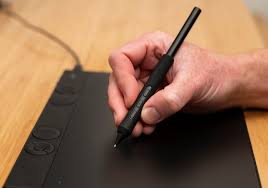
This is the thing that’s hardest to convey in a written review and the thing that matters most. The Pro Pen 3 simply feels better than alternatives at comparable or even higher pressure sensitivity specifications.
Huion and XP-Pen both now offer 16,384 levels of pressure sensitivity — double the Wacom’s 8,192. On paper that sounds like a significant advantage. In practice most artists find 8,192 more than sufficient and some find 16,384 actually too sensitive, requiring constant calibration to get natural-feeling strokes. The number of pressure levels is less important than how those pressure levels are calibrated and how smoothly the pen transitions between them.
The Pro Pen 3’s pressure response is exceptional — smooth, predictable, with no weird pressure bumps or inconsistencies. The tilt recognition works naturally across creative applications. The battery-free design means you never interrupt a session to charge the pen. And the new customisation options — adjustable grip, weight inserts, multiple nib types — let you tune the pen to feel exactly right in your hand.
One thing worth knowing: the Intuos Pro is Wacom’s first professional tablet with dual pen technology, meaning it works with the Pro Pen 3, older Wacom Pro Pen 2, and third-party EMR pens from Pilot, LAMY and Staedtler. For artists who already own Wacom pens or have invested in specific styluses, that backward compatibility is genuinely valuable.

The ExpressKeys and Dials — A Controversial Change
Moving the ExpressKeys to the top of the tablet and replacing the touch ring with mechanical dials was the design decision that generated the most discussion among existing Intuos Pro users when the 2025 model launched.
The honest verdict is that the dials are genuinely excellent once you’re used to them. Physical mechanical dials for zoom, brush size, rotation and other functions have a tactile satisfaction that the old touch ring didn’t. The issue is the repositioning — reaching up and over to the top of the tablet rather than to the left side takes adjustment. Artists who had their old ExpressKey muscle memory deeply embedded found it frustrating initially.
For new users coming to the Intuos Pro without existing habits it’s a non-issue. For experienced Wacom users making the jump it’s a genuine adaptation period of a week or two before it becomes natural.
Setup and Compatibility
Setup is straightforward — plug in via USB-C (included cable) or connect via Bluetooth, install the Wacom Center software and you’re working within minutes. The Wacom Center handles driver updates, customisation settings and firmware automatically. Works on both Mac and Windows without issues.
The one practical catch that’s worth knowing about for UK buyers: the included cable is USB-C to USB-A. If your laptop only has USB-C ports — which is increasingly common on modern MacBooks and Windows ultrabooks — you’ll need to supply your own USB-C to USB-C cable or use an adapter. A minor inconvenience but worth knowing before you sit down to set it up.
Battery life is rated at 16 hours — in real-world use expect closer to 12 hours of active use which is still excellent. Charges in around two hours.
Wacom Intuos Pro vs the Competition
| Wacom Intuos Pro Medium | Huion Kamvas Pro 13 | XP-Pen Artist Pro 14 | |
|---|---|---|---|
| UK Price (approx) | £375 | £250 | £220 |
| Pressure sensitivity | 8,192 | 16,384 | 16,384 |
| Display | ❌ Pen tablet only | ✅ Screen tablet | ✅ Screen tablet |
| Wireless | ✅ Bluetooth 5.3 | ❌ | ❌ |
| Pen battery | ✅ Battery free | ✅ Battery free | ✅ Battery free |
| Build quality | ⭐⭐⭐⭐⭐ | ⭐⭐⭐⭐ | ⭐⭐⭐⭐ |
| Driver stability | ⭐⭐⭐⭐⭐ | ⭐⭐⭐⭐ | ⭐⭐⭐ |
| Best for | Professionals, daily use | Artists who want a screen | Budget-conscious artists |
The comparison that matters most for UK buyers is Wacom Intuos Pro vs Huion specifically. Huion has closed the quality gap significantly in recent years and at £125 less than the Intuos Pro Medium the question of whether Wacom’s advantages justify the premium is genuinely worth asking.
The honest answer is: for professional artists who use their tablet 4-8 hours a day, yes. The pen feel, driver stability and build quality differences are real and they compound over years of daily use. For artists using a tablet a few hours a week, Huion is excellent value and the differences are less material.
The Honest Verdict
The 2025 Wacom Intuos Pro is the best pen tablet available. That’s not a controversial statement — it’s simply what it is. The Pro Pen 3 is exceptional, the build quality is premium, the wireless functionality is excellent, and the customisation options are genuinely the most extensive on the market.
The question is whether you need the best pen tablet available, and that depends entirely on how seriously you take your digital art practice and how much of your time and income depends on it.
For a professional illustrator, concept artist, digital painter or anyone who spends significant creative hours at a tablet — yes, the Wacom Intuos Pro is worth every penny of its price. It’s the kind of tool that lasts a decade and earns its cost back many times over. The person above who mentioned their 2013 Intuos Pro still working perfectly in 2026 is not unusual — Wacom tablets are genuinely long-lived investments.
For someone learning digital art, exploring illustration as a side practice, or working on a tighter budget — the Wacom Intuos (non-Pro) or a Huion alternative is a more sensible starting point. Learn on that, develop your practice, and upgrade to the Intuos Pro when you’re using it enough to justify the investment.
Zach is making good use of his. Whether he upgrades to a screen tablet next is a conversation for another day — one that Lucy will almost certainly have opinions about when it involves another significant purchase.
Rating: 4.5/5 — Exceptional tool for professional digital artists. Overkill for beginners but the right long-term investment for serious practitioners.
→ Compare Wacom Intuos Pro Prices on DAS
Should You Buy It?
If you’re thinking about getting into digital art and you want to understand the wider picture — from which software works best to how to start selling your digital work — we have a complete guide to selling your art online that covers the full journey. And if you use Adobe Creative Cloud alongside your tablet, our Adobe Creative Cloud review for artists is worth reading — it covers which apps actually matter and which plans are worth the money.
Using a Wacom Intuos Pro or considering one? Let us know your thoughts in our Facebook community of 15,000 UK artists. Drawing tablet opinions are reliably passionate and the community always has useful first-hand experience to share.